A Turntable Setup, Part by Part
A turntable is a chain of mechanical and electrical handoffs. Learn how the signal travels through each part and where to look when playback goes wrong.
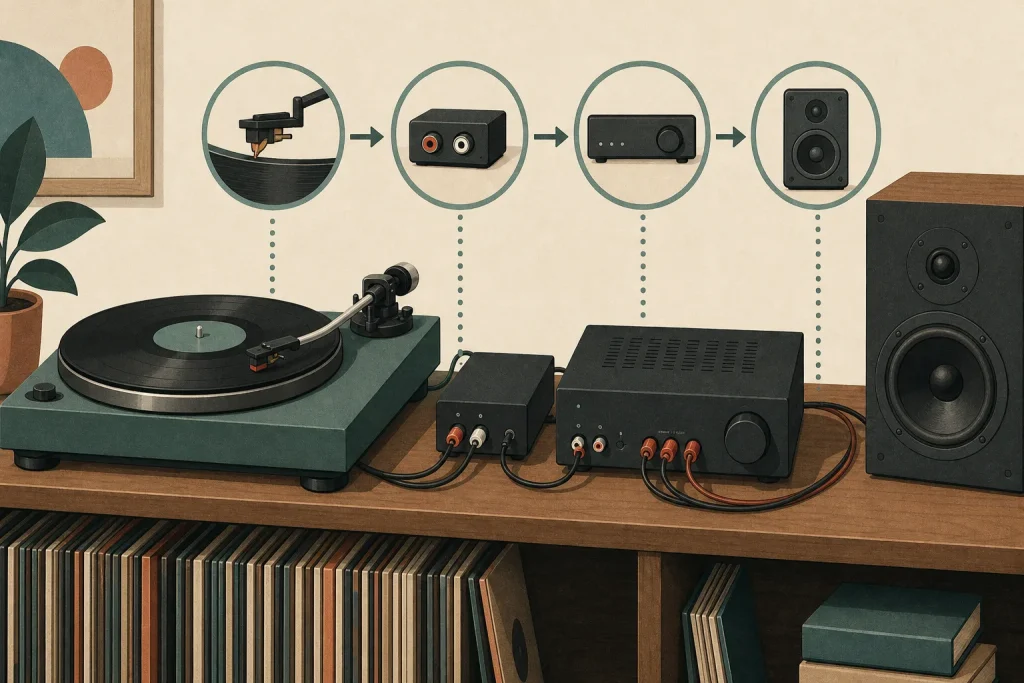
You lower the cueing lever, the stylus settles onto the record, and the speakers answer with a low hum instead of music. The turntable may look like one device, but playback depends on several parts passing a small signal along in the right order. Follow that route before adjusting anything, and the fault is less likely to become a new fault with better cable management.
The signal follows a clear route
The basic path is:
Record groove → stylus and cartridge → tonearm wiring and turntable output → phono stage → amplifier → speakers.
A phono stage may be built into the turntable or amplifier, or sit in a separate box. Powered speakers contain amplification; passive speakers need an amplifier between them and the signal source. The exact connections vary by equipment, so use the labels and manuals for your specific models.
The groove’s tiny variations move the stylus. A cantilever transfers that movement to the cartridge, where a generator turns it into an electrical signal. The cartridge is attached to the headshell and tonearm, which guides it across the record. Fine wires carry the signal from the cartridge to the turntable’s output.
The stylus and tonearm track the groove
If the stylus skips, mistracks, or sounds distorted, start with the record and the parts that guide the stylus. Check that the record lies flat and is free of obvious dust. If you see dust on the stylus, consult the turntable or cartridge manual before cleaning it. Use only a stylus-cleaning tool approved for that cartridge, and follow its maker’s specified direction and method. Avoid pressing on the cantilever or improvising with a cloth or household brush.
Check the tracking force against the cartridge maker’s instructions. If the tonearm has been moved or its counterweight adjusted, follow the turntable and cartridge manuals to balance the arm and set the force. Do not estimate the setting by eye. If the cartridge looks crooked or the stylus appears bent, stop playing records and contact the manufacturer or a qualified repair technician. A bent stylus is not improved by optimism.
The platter and motor set the pace
The platter supports the record while a motor turns it. Some designs use a belt between the motor and platter; others drive the platter directly. The speed selector sets the intended playing speed, while the mat helps support the record.
If the music sounds consistently too fast or too slow, check that the speed selector matches the information on the record label or sleeve. If it does, make sure the platter is seated correctly. On a belt-drive model, consult the manual before lifting the platter or handling the belt; check for a belt that is displaced or twisted only as the manufacturer describes.
Wavering pitch can point to uneven rotation. Check that the turntable stands on a stable, level surface and that the platter turns freely. If it still drifts after these basic checks, consult the manual or a technician about the motor or speed-control system. Do not spray household lubricant into the mechanism. A turntable is not a squeaky door.
The phono stage prepares the signal
A cartridge’s output is much quieter than the line-level signal expected by most amplifiers, and records require specific equalization during playback. A phono preamp, also called a phono stage, amplifies and equalizes the signal. It may be built into the turntable, built into the amplifier, or supplied as a separate component.
If playback is faint and thin, check where the phono stage is located. A turntable set to PHONO needs a phono input or an external phono preamp. A turntable set to LINE can connect to a line-level input such as AUX. Do not connect a LINE output to a PHONO input unless the equipment manual explicitly calls for that arrangement; the extra gain and equalization can overload the sound.
Some turntables have a ground wire. If the amplifier or preamp has a grounding terminal, use the manual to confirm the connection point and attach the wire as directed. For a steady hum, check that the audio plugs are seated and that any ground wire is connected as specified. Keep signal cables away from power adapters where practical. If hum persists, a damaged cable or grounding problem may need attention from a technician.
The amplifier and speakers complete the route
An amplifier supplies power to passive speakers. Powered speakers contain their own amplification and may connect directly to a turntable’s LINE output or to an external phono preamp. The correct arrangement depends on the equipment; consult the manuals rather than relying on a connector’s shape.
If one speaker is silent, lower the volume before checking cables. Confirm that the turntable outputs are fully seated, the amplifier is set to the intended input, and the speaker connections are secure. If the problem remains, swap the left and right input plugs at the amplifier, following its manual if the connections are unclear. If the silent side moves with the plug, the issue is likely upstream in the turntable or cable path. If it stays with the same speaker, inspect the amplifier output, speaker cable, and speaker.
Say a turntable is connected to an amplifier, but only the right speaker plays. The starting setup is a turntable with separate left and right output plugs, an amplifier, and two passive speakers. First, lower the volume, reseat both plugs, and check that the balance control is centered. If both speakers then play, the loose connection was the likely cause. If the left remains silent, swap the two input plugs at the amplifier. If the silence moves to the right speaker, the fault is upstream of that input; if the left speaker stays silent, check the amplifier’s left output, its speaker cable, and the speaker. The result narrows the next place to inspect without changing several parts at once.
Trace faults in signal order
For no sound, keep the volume low and follow the handoffs from source to speakers:
- Observe whether the platter turns; if it does not, check power and the speed control as the manual directs, and if it does, continue to the stylus and record.
- Observe whether the stylus is lowered onto a clean, playable record; if it is not, correct that setup, and if it is, continue along the output path.
- Observe whether the turntable output is set to PHONO or LINE; if it is PHONO, connect it to a phono input or external phono stage, and if it is LINE, use a line-level input.
- Observe whether the phono stage is present in the chain; if it is missing, add the specified phono stage, and if it is present, check its power and input-output connections.
- Observe whether the amplifier is on the selected source; if it is not, select the correct input, and if it is, check the amplifier’s output connections.
- Observe whether powered speakers have power or passive speakers are connected to an amplifier; if not, restore the required connection, and if they are, inspect the cable seating and consult the relevant manual.
Once music plays, change one connection or setting at a time if a problem returns. Keep the turntable on a firm, stable surface and use a cartridge and stylus compatible with the model. The route is simple enough to remember: groove, cartridge, phono stage, amplifier, speakers. The manuals settle the details that differ between models, especially for cleaning and connections.
Keep listening

A Record Shelf That Makes Its Collection Easier to Browse
A week of small decisions can turn a crowded record shelf into a system you can…

Listening to an Album Without Reading Along
Set aside the lyrics, reviews, and urge to identify every sound. A simple sequence of listening…